Feature & Transport Movement in SAP Cloud ALM
Managing features and transport movement in SAP Cloud ALM brings structure, traceability, and control to change and release processes. This article explains the concepts, prerequisites, step-by-step workflows, best practices, and troubleshooting tips you need to run reliable deployments across development, quality, and production systems.
Core Concepts
Feature: A logical grouping of related changes (requirements, user stories, transports) that represents a deployable unit.
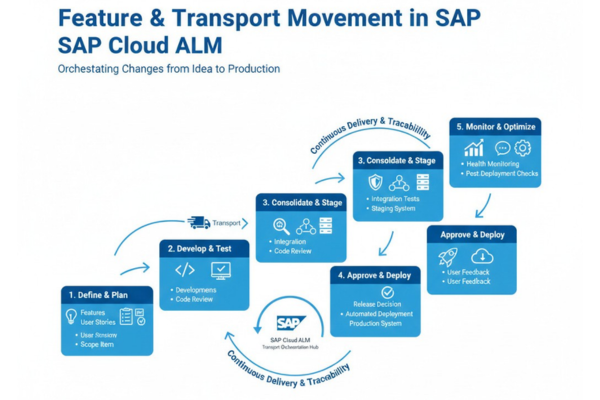
Transport: The technical package that moves configuration or code between systems (DEV → QAS → PRD). SAP Cloud ALM’s Features app orchestrates transports, tracks import status, and documents changes for audit purposes.
Prerequisites and Setup
- Enable Change and Deployment Management in your Cloud ALM tenant and configure transport integration for your landscape.
- Apply required SAP Notes and setup programs on development systems to allow Cloud ALM to create and manage transports (for ABAP and S/4HANA environments).
- Assign roles and authorizations so project users can create features, assign transports, and trigger imports.
These steps ensure Cloud ALM can communicate with your systems and perform transport operations securely.
Typical Workflow
1. Create a Feature
Create the feature in the Requirements or Features app and add a clear title, description, owner, and target release. Features act as the single place to track all related artifacts.
2. Assign or Create Transports
Assign existing transport requests to the feature or create new transport requests directly from the feature (supported after setup). This links technical objects to business context.
3. Group Transports into Collections
Use transport collections (TOCs) or transport of copies to bundle multiple transports for coordinated deployment and dependency management.
4. Release and Orchestrate Imports
Release transports in development and use the Features app to orchestrate imports to Quality and Production systems. Monitor import status and logs in Cloud ALM.
5. Validate Post-Import
Link imports back to test cases and requirements to ensure validation is complete and traceability is preserved.
Best Practices
- Group by business value: Create features that represent deliverables or business outcomes rather than ad-hoc technical bundles.
- Link everything: Always link transports to requirements, user stories, and test cases to preserve end-to-end traceability.
- Use TOCs for complex releases: Bundle dependent transports to avoid partial deployments and reduce import errors.
- Define change classes: Map minor, major, and emergency changes to workflow templates to apply appropriate governance.
- Monitor imports proactively: Watch import logs and status in the Features app to act quickly on failures.
These practices reduce risk, improve predictability, and make audits simpler.
Common Issues and Troubleshooting
- Transport creation fails: Verify required SAP Notes are applied and that Cloud ALM has correct connectivity and authorizations.
- Import errors in Quality/Production: Check dependency sequencing and ensure all prerequisite transports are included in the TOC. Reconcile object locks on the target system.
- Missing traceability: Ensure transports are assigned to the correct feature before release; retroactive linking is possible but less reliable.
When problems persist, consult Cloud ALM logs and SAP Community posts for known issues and fixes.
Governance and Auditability
Cloud ALM captures who changed what, when, and why supporting segregation of duties and audit requirements. Use the Features app to generate traceability reports that show links from requirements to transports and imports, which simplifies compliance and post-go-live reviews.