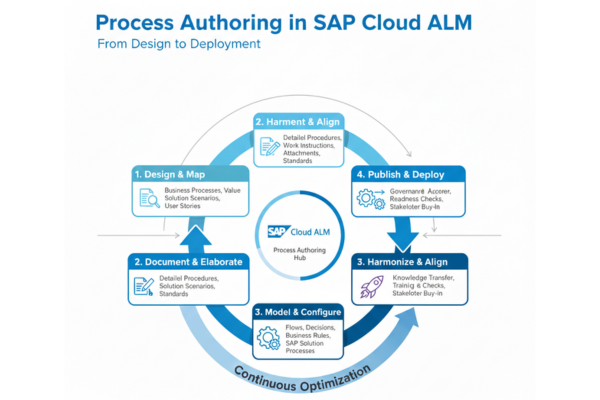
Process Authoring in SAP Cloud ALM
In the world of modern SAP implementations, organizations need more than static documentation and scattered process diagrams. They need a dynamic, cloud-native way to design, refine, and manage business processes throughout the entire application lifecycle. Process Authoring in SAP Cloud ALM delivers exactly that. It empowers teams to create, customize, and govern business processes in a centralized, collaborative environment that aligns perfectly with SAP’s cloud-first strategy.
Process Authoring is not just a modelling tool, it is a strategic capability that helps organizations translate business needs into executable, traceable, and testable processes. Whether you are adopting SAP S/4HANA Cloud, integrating multiple SAP solutions, or managing hybrid landscapes, Process Authoring becomes the blueprint that guides your implementation from exploration to operations.
What Is Process Authoring in SAP Cloud ALM?
Process Authoring is the feature within SAP Cloud ALM that allows users to create, edit, and publish business processes directly in the platform. While SAP Cloud ALM provides extensive pre-delivered content based on SAP Best Practices, Process Authoring gives organizations the flexibility to model their own processes when standard content does not fully match their requirements.
This capability is especially valuable in scenarios where businesses have unique workflows, industry-specific variations, or integration-heavy environments that require tailored process documentation.
Why Process Authoring Matters
Process Authoring solves these challenges by offering:
- A single source of truth for all business processes
- Visual modelling that business and IT teams can understand
- Direct linkage to requirements, user stories, and test cases
- Version control to maintain governance and consistency
- Cloud-native accessibility for distributed teams
It transforms process documentation from static artifacts into living assets that evolve with the project.
Key Capabilities of Process Authoring
1. Create Custom Business Processes
Organizations can build processes from scratch using an intuitive visual editor. This is ideal when documenting:
- Unique business workflows
- Localized variations
- Industry-specific processes
- Non-SAP system interactions
- Transitional or legacy processes
The editor supports activities, roles, systems, and process steps, making it easy to capture real-world business logic.
2. Extend SAP Best Practice Processes
SAP Cloud ALM includes a rich library of SAP Best Practice processes. With Process Authoring, teams can:
- Copy and adapt SAP-delivered processes
- Add custom steps or decision points
- Reflect extensions, integrations, or enhancements
- Tailor processes for specific business units
This ensures that standard content remains relevant and aligned with organizational needs.
3. Visual Process Modelling
The modelling interface is designed for clarity and collaboration. It allows users to:
- Drag and drop process elements
- Define roles and responsibilities
- Map system interactions
- Add documentation and attachments
- Create variants for different scenarios
The result is a clear, visual representation of how the business operates.
4. End-to-End Traceability
One of the most powerful aspects of Process Authoring is its integration with the broader SAP Cloud ALM ecosystem. Each process can be linked to:
- Requirements
- User stories
- Test cases
- Deployment tasks
- Monitoring configurations
This creates a seamless chain from design to build to run, ensuring nothing is lost between phases.
5. Governance and Version Control
Process Authoring supports structured governance through:
- Drafting and publishing workflows
- Controlled updates
- Version history
- Approval processes
Teams always know which version is current, which is in review, and which is obsolete.
How Process Authoring Supports SAP Activate
During Explore
- SAP Best Practice processes guide Fit-to-Standard workshops
- Gaps and enhancements are captured directly in the tool
- Custom processes can be modelled on the spot
During Realize
- Developers and testers rely on authored processes to guide build and test activities
- Linked test cases ensure full coverage
- Requirements remain aligned with process design
During Deploy and Run
- Processes support operational readiness
- Monitoring and alerting can be tied back to process steps
- Documentation remains relevant for future releases